AI Chatbots & Website Assistants
Assistants that answer questions from your own pages, FAQs and documents, capture leads and book calls, and hand the conversation to a person when they are unsure instead of guessing.
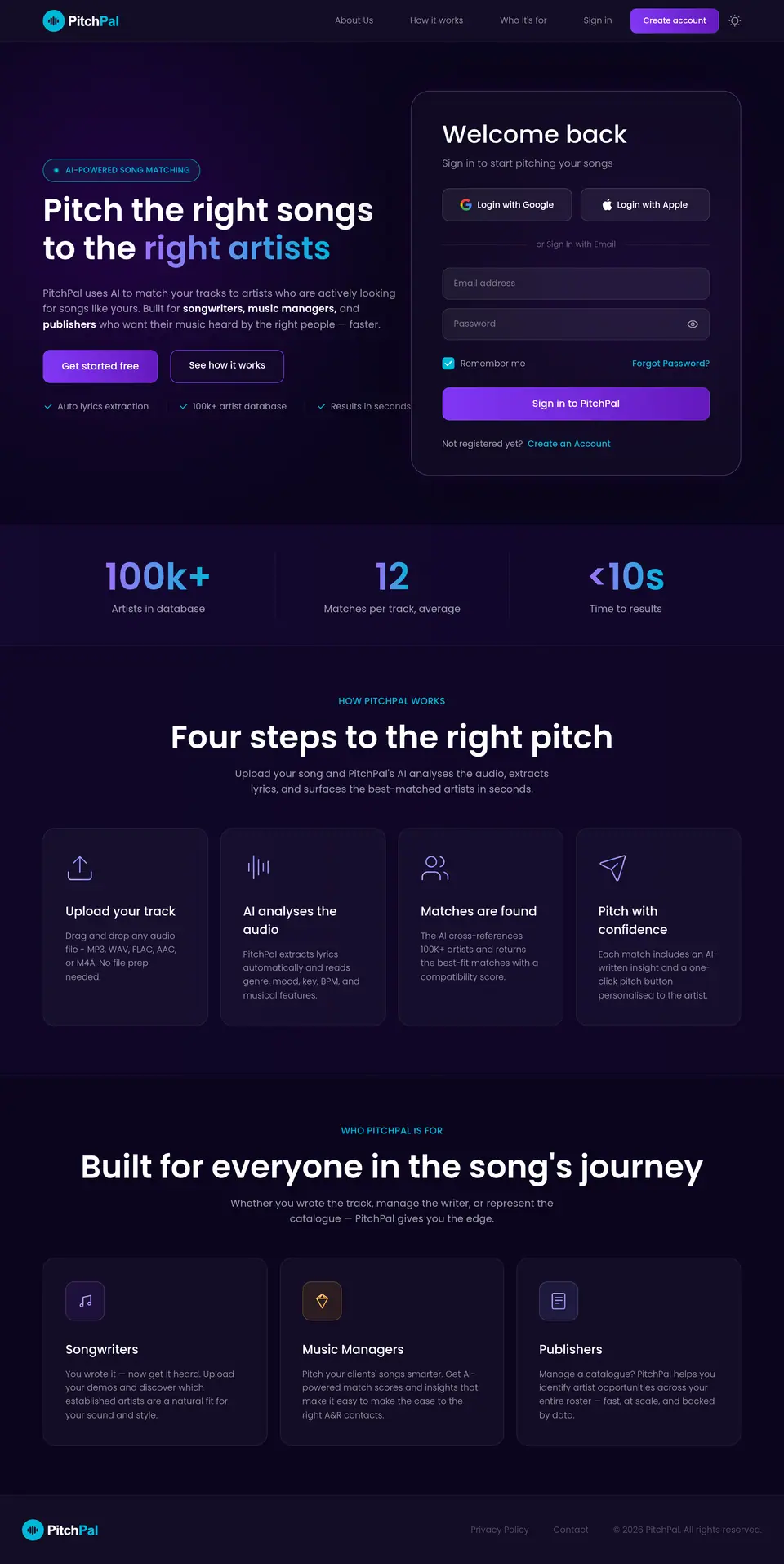
AI agent development is about building software that can read, decide and act on a defined task, not just chat. At Scopun, we build custom AI agents for UK businesses: assistants that answer customer questions from your own content, workflow agents that sort enquiries, read documents and update your CRM, and AI features inside products. We built PitchPal, an AI product that takes an uploaded song, extracts the lyrics, reads its genre, mood, key and tempo, and writes a tailored pitch for each matching artist, so we know what it takes to get AI working in a real product.
We are also honest about the limits. An agent is only as good as the data and the process behind it, and plenty of jobs are better done by a simple automation or a well-designed form. We usually start with one narrow, measurable task, build in guardrails and human approval where the stakes are high, and test the agent against your real examples before anyone relies on it.
Every project is planned around UK GDPR from the first call: what data goes to which model provider, how long it is kept and who can see it. Book a free consultation and we will give you a straight answer on whether an AI agent is worth building for your business, and if it is, how we would build, test and run it for a fixed price.
RAG
answers from your own content
UK GDPR
data handling planned in
4.6★
Rated on Trustpilot
UK
GMT/BST team

WECOLOUR
Hair colour eCommerce · UI/UX design, eCommerce development
An AI agent is software built around a large language model (LLM) that can understand a request, decide what to do and use tools to do it: look something up, fill in a record, draft a reply or pass the job to a person. AI agent development covers everything around the model that makes it useful and safe: the instructions, the data it can see, the systems it connects to, the limits on what it may do and the testing that shows it works.
The model is the easy part. The hard part is the structure underneath: clean data, a clear task and firm rules for when a person steps in. We wrote about this in Intelligence Follows Structure, and it shapes how we approach every AI project.
Our AI agent development services include:
Assistants that answer questions from your own pages, FAQs and documents, capture leads and book calls, and hand the conversation to a person when they are unsure instead of guessing.
Agents that sort incoming email and enquiries, read documents and pull out the details, draft replies and reports, and update your CRM or spreadsheets, with a person approving anything that matters.
A business AI assistant that searches your policies, manuals and past work through a vector database, answers in plain English and shows the source documents, so your team can check every answer.
AI built into your product: speech-to-text, audio and text analysis, and AI-written summaries. For PitchPal we built automatic lyric extraction, track analysis and a personalised pitch for each matching artist.
We connect agents to the systems you already use, including CRMs, helpdesks, email, Google Workspace, Microsoft 365, databases and APIs, giving each one only the access its task needs.
Clear limits on what the agent may do, approval steps for risky actions, testing against your real examples, and monitoring of quality and cost once it is live.
PitchPal turns an uploaded song into lyrics, analysis and a written pitch for each matching artist. We know where AI holds up in production and where it needs support from plain code.
If a simple automation, a better form or a tidier process would solve the problem, we will say so. AI goes only where it earns its place.
Agents work within limits you set. Anything risky, such as emailing a customer or changing a record, can wait for a person to approve it.
We map what data each agent sees, which model provider processes it, how long it is kept and who can access it, before anything is built.
We build a test set from your own enquiries, documents and edge cases. The agent has to pass it before launch and again after every change.
A written proposal with a fixed price before work starts, or a monthly plan for ongoing work. The same UK team works with you from the first call to long after launch.
Featured AI project
PitchPal helps songwriters, music managers and publishers find the right artist for a song. You upload a track, and the AI does the listening, the matching and the first draft of the pitch.
We designed and built the whole product, from the interface to the AI pipeline behind it. It is a good example of how we use AI: a clear task, the right model for each step, and plain code for everything that does not need AI.
Built with
Free consultation
Book a free 30-minute call. We'll map out next steps and send a fixed-price proposal within a few days.
We choose the model for each task rather than tying you to one provider, and build on established retrieval, speech and integration tools that we can test and maintain.
Language models
Open-source & on-device
Retrieval (RAG)
Speech & audio
Agents & tuning
Back end & hosting
Integrations
The cost of AI agent development depends on how complex the task is, how many systems the agent connects to, how ready your data is and how much testing and human review it needs. We scope every project individually and agree a fixed price in writing before work starts. Model usage is charged separately by the AI provider, and we estimate it with you before launch.
Projects we quote for
Each one is priced on its own scope, with a fixed quote agreed in writing before work starts.
Get a free quoteWhat affects the cost
Scope of the task
How many jobs the agent does, how many steps each one has, and how much judgement is involved.
Data and content
Whether your documents and records are clean and in one place, or need sorting and structuring before the agent can use them.
Integrations
How many systems the agent reads from or writes to, such as your CRM, helpdesk, email or database, and whether they have usable APIs.
Guardrails and approval
How much human review is built in, what the agent must never do, and how closely every action is logged.
Testing and accuracy
How many real examples we test against, and how high the accuracy bar needs to be before launch.
Running and support
Model usage charged by the AI provider, plus monitoring, updates and new tasks once the agent is live.
Every project starts with a free consultation. You then receive a written, fixed-scope proposal that sets out the deliverables, timeline and cost before any work begins, so there are no day rates or surprise invoices. With Scopun you also get a full team of designers, developers, a project manager and QA, rather than a single freelancer with no cover for holidays, illness or overload.
Timelines depend on the task, how many systems the agent connects to, how ready your data is and how much testing it needs. Typical timings from project start:
2 to 4 weeks
Proof of concept on one task
3 to 6 weeks
Website AI assistant
4 to 8 weeks
Workflow agent or knowledge assistant
8 to 16 weeks
Multi-system agent or product AI feature
Your proposal lists the full timeline before we begin. We track each project with clear steps, weekly check-ins, and a shared plan, so you always see the latest progress.
Every Scopun project follows the same seven steps, so you always know what comes next.
A free call to understand the task, the data behind it and whether an agent is the right answer, or whether a simpler automation would do.
A written plan with the task, systems, guardrails, success measures, timeline and fixed cost, agreed before any work starts.
We map how the agent should behave, what it may and may not do, and try a working prototype on your real examples.
We build the agent, its tools and its integrations, with logging and approval steps written in from the start.
The agent is tested against a set of real cases, including the awkward ones, and we fix what fails before anyone relies on it.
We roll out to one channel or a small group first, watch the results closely, then widen use once it holds up.
We monitor quality and cost, update prompts and models as providers change them, and add new tasks once the first one works.
A simple automation follows fixed rules: when a form is submitted, add a row and send an email. It is cheap, predictable and the right choice for most repeatable tasks with tidy input.
An AI agent reads messy input such as emails, chats and documents, decides which steps to take and uses tools to act, within limits you set. It earns its place when the task needs language or judgement.
Many good projects use both: plain automation for the predictable steps and an agent only where reading or writing is involved. We will tell you which parts need AI and which do not.
Explained in depth
Pick a topic to read it. Each one takes a minute or two.
AI agent development means building software that uses a language model to understand a task and carry it out with tools. A chatbot answers. An agent can also act: check an order, read an attached invoice, update a record or draft a reply for someone to approve. The model brings the language skills. Everything else, the instructions, the data, the tools and the limits, has to be designed and built around it.
In practice an agent works in a loop. It reads the input, such as an email, a chat message or a document, works out what is being asked, chooses a tool, checks the result and either finishes or takes another step. Each tool is a piece of normal code we write: a search over your documents, a call to your CRM, a calculation or a message to a person. The model decides which tool to use, but the tools themselves are predictable and tested.
That split is what makes an agent dependable. The things that must be exact, such as order numbers, stock levels, dates and permissions, come from your systems through code, not from the model's memory. The model handles what it is good at: reading messy language, sorting, summarising and writing. When a job needs judgement the agent should not make alone, it stops and asks a person.
Plenty of tasks that sound like a job for AI are better solved by a simple automation or a clearer form. Not every piece of AI automation for business needs an agent. If every enquiry already arrives through a form with the right fields, plain rules can route it without a model. If the answer to a question is always the same, a well-written FAQ page is cheaper and never wrong. We would rather tell you that on the first call than build something that adds cost and risk without adding value.
Agents also struggle where the input is fine but the knowledge is missing. If the answers live in one person's head, in out-of-date documents or across three spreadsheets that disagree, the agent will be confidently inconsistent. We make this case in more depth in Intelligence Follows Structure: the useful intelligence in an AI product comes from the structure underneath it, not from the model on its own.
Our honest test has three questions. Is the input varied, written language that fixed rules cannot handle well? Does the task come up often enough for automation to matter? Can we check whether the agent got it right? If the answer to all three is yes, an agent is worth exploring. If not, we will suggest the simpler route, and we are happy to build that instead.
The AI projects that work usually start small: one task, one channel and a clear way to tell whether it is better than before. Sorting incoming enquiries into a handful of categories is a good first task. Running your whole customer service operation is not. A narrow task is quicker to build, easier to test and far easier to trust, and it teaches you a lot about your own data and processes along the way.
Before we build, we agree what success looks like in plain terms. That might be how many enquiries reach the right person first time, how long customers wait for a first reply, or how often someone has to correct a draft. We record how the task is done today, so there is something honest to compare against rather than a general feeling that things are quicker.
Once the first task is working and trusted, adding the next one is much quicker. The integrations, logging, test set and approval steps are already in place, and your team knows how the agent behaves. If you have a long list of AI ideas, the useful step is picking the one with the clearest payoff and doing it properly, then building from there.
A website AI assistant answers visitors' questions from your own content and hands over to a person when it cannot help. Our AI chatbot development starts with your service pages, FAQs, policies and product information, so answers match what you actually offer rather than what a general model guesses. When the assistant is unsure, it says so and offers a callback, an email or a live handover instead of making something up.
The assistant can also do useful work inside the conversation. It can ask the qualifying questions your team would ask, capture contact details into your CRM, check availability and book a call, or point people to the right page. Every conversation is logged, so you can see what customers ask about, where the assistant struggled and which pages on your site need clearer answers.
We design the assistant to feel like part of your site, not a bolt-on widget. That means your tone of voice, a clear note that people are talking to an AI, an easy way to reach a person and firm limits on topics it should not discuss. It also means being honest about scope: an assistant that handles your common questions well is more useful than one that attempts everything badly.
Internal workflow agents take on the repetitive reading and typing that sits between your inbox and your systems. A triage agent reads each incoming email or enquiry, works out what it is about and how urgent it is, and routes it to the right person or queue with a short summary. A document agent reads invoices, order forms, applications or reports and pulls the details you need into a structured record.
From there, agents can draft the reply, the report or the follow-up for a person to check and send, and update your CRM, helpdesk or spreadsheet with what they found. They use tools to do this, so they work with your real systems instead of copying text between windows. Our article AI Beyond the Chatbot looks at more examples of agents working inside internal workflows.
The design choice that matters most is where a person signs off. For low-risk steps, such as tagging an email or filling in a draft, the agent can act on its own. For anything that leaves the business or changes important data, such as sending a customer email or updating an account, it prepares the work and waits for approval. That balance can shift as trust builds.
A knowledge assistant lets your team ask plain-English questions and get answers from your own documents, with sources shown. Policies, manuals, contracts, product specifications, past proposals and support notes all become searchable by meaning rather than by exact keywords, so people find the right paragraph even when they do not know what it is called or where it is filed. It works across the formats you already keep, such as PDFs, Word files and shared drives.
The technique is called retrieval-augmented generation, or RAG. Your documents are split into passages and stored in a vector database such as Pinecone, Qdrant or pgvector. When someone asks a question, the most relevant passages are found and given to the model, which writes an answer based only on them. Because each answer links to the passages it came from, anyone can check it in a click.
Good results depend on the documents more than the model. We help decide which sources to include, remove out-of-date versions and set up a way to keep the index current as documents change. We also respect permissions, so people only get answers from documents they are allowed to see. Where a question has no answer in your documents, the assistant says so rather than inventing one.
Sometimes the right place for AI is inside a product your customers already use, rather than in a separate chat window. We built PitchPal for songwriters, managers and publishers. They upload a track, and the app extracts the lyrics automatically, reads the genre, mood, key and tempo, and matches the song against a database of over 100,000 artists with a compatibility score. For each match, it writes an AI insight and a personalised pitch.
Under the bonnet, PitchPal runs on Node.js, with AssemblyAI for speech-to-text, Claude from Anthropic for the AI writing, Resend for email and Cloudflare in front. The lesson that carries over to every AI feature is that the model does one part of the job. Upload handling, audio processing, matching, scoring and the interface around them are ordinary web development, and they decide whether the product feels reliable.
If you are adding AI to a product or app, we look at the same questions. What should the AI do, and what should stay as plain code? How do users see and correct what it produces, which is as much a UI/UX design question as an AI one? What happens when a provider is slow or down? What does each use cost, and does that work at the volumes you expect? Answering those early saves rework later.
An agent becomes useful when it can work with the systems your business already runs on. We connect agents to CRMs, helpdesks, email, Google Workspace, Microsoft 365, databases and other tools with an API, so they can read the context they need and record what they did. That might mean checking a customer's history before drafting a reply, or opening a ticket with the right tags and priority.
Integration is where most of the care goes. Each agent gets its own credentials with the narrowest access its task needs, so a triage agent that only reads email cannot delete records. Write actions go through code we control, with checks on every value, rather than letting the model write straight to your database. Every action is logged with what was done, when and why.
Where a system has no usable API, we look at alternatives such as scheduled exports, a shared inbox or a small middle layer, and we say plainly if the result will be fragile. We also plan for failure: if a system is down or returns something unexpected, the agent pauses and flags it instead of carrying on with bad data. The aim is an agent your team can rely on every day.
Guardrails are the rules that keep an agent inside its job, and we design them before the agent is built. They cover which topics it will discuss, which tools it may use, what it must never do and when it must stop and hand over to a person. Some are instructions to the model. The important ones are enforced in code, so they hold even if the model misreads a request.
Human approval is the most useful guardrail of all. The agent prepares the work, a person reviews it on a simple screen or in their inbox, and nothing happens until they approve it. For early launches we often route every action through approval, then relax it for low-risk steps once the logs show the agent is getting them right. You decide where that line sits.
We also design for misuse. A public assistant will meet people trying to make it say something odd or reveal its instructions, and documents can contain hidden text written to trick an AI, known as prompt injection. We test for these cases, keep sensitive data out of the model's reach where the task does not need it, and limit what any single conversation can trigger.
You cannot judge an AI agent from a demo; you judge it by how it handles a large set of real cases, awkward ones included. Before launch we build a test set from your own material: past enquiries, real documents, tricky questions and the edge cases your team already knows about. Each case has an expected result, so we can see how often the agent gets it right and where it goes wrong.
The test set runs every time we change a prompt, a tool or the model. That matters because a fix for one problem can quietly break something else, and providers update their models. Some checks are exact, such as whether a field was extracted correctly. Others need judgement, such as whether a reply is accurate and in the right tone, and we review those with you.
We agree the accuracy bar with you before launch, based on what a mistake would cost. A triage agent that now and then sends an email to the wrong queue may be fine if someone checks the queue. An agent drafting replies to customers needs a higher bar and approval on every send. When a mistake turns up after launch, it becomes a new test case.
Using an AI model means sending data to it, so the first data protection question is what goes where. Before we build, we map the personal data the agent will see, which model provider processes it, in which region and on what terms. We choose provider plans whose terms say your data is not used to train their models, and we check retention settings so data is not kept longer than needed.
We keep data to a minimum. If a task does not need names, account numbers or health details, we strip them out before anything reaches the model. Logs are kept for a set period and access to them is limited. For sensitive work, open-source models can run on your own servers or devices with tools such as Ollama, so the data never leaves your control.
You remain the data controller, so we give you what you need to meet your obligations: a clear record of the data flows, the providers involved and their data processing terms, and help with a data protection impact assessment where one is needed. People should also know when they are dealing with an AI, and have an easy route to a person or a way to opt out.
There is no single right model, so we choose one for each task based on quality, speed, cost and how the data has to be handled. We work with Anthropic Claude, OpenAI GPT-4o and Google Gemini, and with open-source models through Hugging Face, Replicate or on-device tools such as Ollama and MLX. We try the candidates on your real examples rather than relying on general benchmarks.
Different parts of one agent often suit different models. A small, fast model can sort and tag incoming messages cheaply, while a stronger model writes the replies customers will read. Speech-to-text uses dedicated tools such as Whisper or AssemblyAI. For narrow, repetitive tasks, fine-tuning a smaller model with LoRA can sometimes match a larger one at lower running cost, though it is rarely the first step.
Models change often, with new versions arriving and old ones retired. We build agents so the model sits behind a single layer of code, which means it can be swapped or upgraded without rebuilding everything, and the test set tells us whether the new model is actually better on your work. You are never tied to one provider because of how we built it.
An agent is not finished at launch; it needs watching, tuning and the odd update, like any system your business relies on. We monitor what the agent is asked, what it does, where it hands over to people and where people correct it. Those signals show where the instructions, data or tools need work, and they often reveal gaps in your own documents or processes too.
Running costs need the same attention. Most model providers charge by usage, so the cost depends on how many requests the agent handles and how much text each one involves. We estimate this with you before launch, set spending limits and alerts with the provider, and keep costs down with sensible choices: smaller models for simple steps, caching repeated work and sending the model only the text it needs.
After launch we can look after the agent on a monthly plan: monitoring quality and cost, updating prompts and models as providers change them, keeping the document index current and adding new tasks once the first one is trusted. If you have your own developers, we can hand over the code, documentation and test set instead, so your team can run it with confidence.
We price AI agent development by scope, with a fixed price agreed in writing before any work starts. After a free consultation, we send a written proposal setting out the task, the systems involved, the guardrails, how the agent will be tested, the timeline and the cost. You know exactly what you are getting before you commit, and there are no open-ended invoices.
The main things that move the cost are how complex the task is, how many systems the agent connects to, how much work your data needs before the agent can use it, how much human review is built in and how high the accuracy bar must be. A focused website assistant answering from existing pages is a contained project. An agent working across several systems with approval steps is a larger one.
Where the task or the data is still uncertain, we often suggest a short proof of concept on one task first, with its own fixed price. It shows whether the idea works on your real data before you commit to a full build. Model usage is a running cost charged by the AI provider, separate from the build, and ongoing support is available on a monthly plan.
Everything needed to get a useful agent working: scoping the task, choosing the model, preparing your data, building the agent and its integrations, setting guardrails and approval steps, testing against real examples, launching in stages and monitoring quality and cost afterwards. That can be a website assistant, an internal workflow agent, a knowledge assistant over your documents or an AI feature inside your product.
It depends on the task, how many systems the agent connects to, how ready your data is and how much testing and human review it needs. After a free consultation you get a written proposal with a fixed price before any work starts. Running costs, mainly model usage charged by the AI provider, are separate, and we estimate them with you so there are no surprises once the agent is live.
A proof of concept on one task typically takes 2 to 4 weeks, a website assistant 3 to 6 weeks, and a workflow agent or knowledge assistant 4 to 8 weeks. Agents that work across several systems, or AI features inside a product, typically take 8 to 16 weeks. Your timeline is confirmed in writing before work begins.
A chatbot answers questions in a conversation. An AI agent can also take actions: look up an order, update a CRM record, draft a reply or route an enquiry to the right person. Many of the assistants we build do both, answering from your content and using tools when a request needs something done, always within limits you set.
It can be, if you have a repetitive task that involves reading or writing, such as sorting enquiries, answering the same questions or pulling details out of documents, and it comes up often enough to matter. If the task is rare, simple or depends on knowledge that lives in people's heads, a basic automation or a better form is often the smarter choice. We will tell you honestly on the first call.
Yes. We connect agents to CRMs, helpdesks, email, Google Workspace, Microsoft 365, databases and other tools with an API. Each agent gets only the access its task needs, every action is logged, and anything risky, such as emailing a customer or changing a record, can be held for a person to approve.
Before we build, we map what personal data the agent will see, which model provider processes it and where, how long it is kept and who can access it. We use provider plans whose terms say your data is not used for training, strip out data the task does not need and set retention limits. You get a clear record of the data flows for your own compliance, and where data must not leave your control, we can use privately hosted models.
Yes. We built PitchPal (pitchpal.co.uk), an AI product for songwriters, managers and publishers. You upload a track and it extracts the lyrics automatically, reads the genre, mood, key and tempo, matches the song against a database of over 100,000 artists with a compatibility score, and writes an AI insight and a personalised pitch for each match. It runs on Node.js, with Claude from Anthropic for the writing and AssemblyAI for speech-to-text.
Case studies
Real client websites we have redesigned, shown as they were and as they are now.

Hair colour eCommerce
WECOLOUR
A full UI/UX redesign for a Dutch hair colour webshop
See before & after
WordPress · Online magazine / publishing
The Coolector
A magazine-style redesign for a men’s lifestyle publication on WordPress
See before & after
Shopify · Home fragrance & wellbeing eCommerce
Juniper & Hare
From a basic GoDaddy shop to a Shopify store with real character
See before & afterTell us about your project. Free consultation, and we reply within one business day.
The AI projects that work are usually the focused ones: one clear task, good data, sensible limits and proper testing. At Scopun, we build custom AI agents and AI features for UK businesses, and we are straight with you about what they can and cannot do.
Bring us the task that takes up your team's time, and we will tell you whether an agent, a simple automation or neither is the right answer. Book your free 30-minute consultation today.